
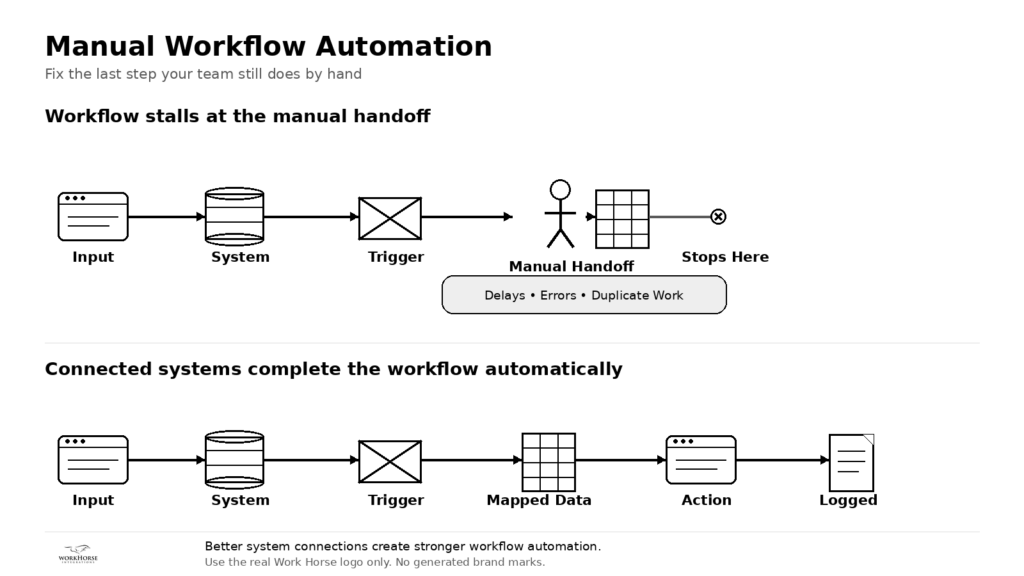
Manual workflow automation often starts with a simple question: where does your team still finish the process by hand? A workflow does not have to be completely broken to cost your business time. Sometimes the biggest opportunity sits in the final manual step.
A form may collect the right information, but someone still has to update the CRM. An order may come in automatically, but a team member still has to match it to a shipment. A report may exist, but someone still has to export data from three systems and combine it in a spreadsheet.
Those steps may feel small. Over time, they create delays, errors, duplicate work, and frustration.
That is why manual workflow automation matters. It helps businesses find the handoffs that people have accepted as normal and replace them with cleaner, more reliable system connections.
What manual workflow automation really fixes
Manual workflow automation does not mean automating everything at once. It means finding the repetitive step that slows the process down and deciding whether software should handle that handoff instead.
Workflow automation can help streamline manual, repetitive, and time-consuming business processes. Operations automation also helps teams look across departments and decide which processes deserve attention first.
For many businesses, the best starting point is not a massive transformation project. The better starting point is one workflow that already creates daily friction.
That workflow might involve customer intake, order updates, shipment notifications, lead follow-up, CRM cleanup, invoice routing, appointment reminders, or reporting. The exact process will vary, but the pattern usually looks familiar.
The business has software in place. The workflow moves part of the way on its own. Then the process stops, and a person has to finish it manually.
That final handoff often reveals the real system gap.
The last manual step can hide the biggest cost
Manual steps create more than inconvenience. They slow response times, increase the chance of errors, and make the business more dependent on individual memory.
A team member may know exactly which spreadsheet to update. Another person may understand which email means the order shipped. Someone else may remember which CRM field needs to change before the next follow-up goes out.
That knowledge keeps the business moving, but it also creates risk.
When the process depends on one person remembering the next step, the workflow becomes harder to scale. Training takes longer. Mistakes become easier to miss. Customers may wait longer for updates. Managers may struggle to see where work stands.
The issue is not the employee. The issue is the disconnect between systems.
Why “mostly automated” is not the same as efficient
Many companies already use automation in parts of their operations. They may have online forms, email notifications, CRM tasks, accounting tools, order systems, or reporting dashboards.
The problem appears when those tools do not complete the full workflow.
A process can look modern on the surface while still depending on manual work behind the scenes. The team may receive the right notification, but someone still has to copy the data. A system may generate a report, but another person still has to clean it up. An app may collect a lead, but the CRM still needs a manual update.
That is where manual workflow automation can create meaningful value.
Instead of replacing the whole process, the business can target the step that causes the most rework. A focused integration can move data between systems, trigger the next action, send a notification, update a record, or flag an exception for review.
That approach saves time without creating unnecessary complexity.
A workflow rescue starts with one process
A workflow rescue works best when the business starts small and specific.
Choose one process that your team talks about often. Look for the task that makes people say things like:
“We still have to enter that manually.”
“This part always slows us down.”
“We have to check another system first.”
“We use a spreadsheet to finish it.”
“The automation works until this step.”
“We have to clean this up every week.”
Those comments point to a workflow rescue opportunity.
After choosing the process, map how the work actually happens. Identify what starts the workflow, which systems participate, where data needs to go, and where the manual handoff appears. Then review what happens when the information does not match.
That exercise usually shows whether the business needs a simple automation, a better system connection, a custom API, stronger monitoring, or a broader integration plan.
What this looks like in real business operations
Work Horse Integrations has seen this pattern in practical client work.
One business received a high volume of order and shipment emails. The owner spent hours each day matching order notifications to shipment notifications and sending customer confirmation emails. The work was necessary, but it pulled time away from business development.
Work Horse designed an automated process that extracted key information from the order and shipment emails, matched the details, sent the confirmation message, and added logging and monitoring for exceptions. The process reduced daily manual effort and gave the business a more scalable way to handle order communication.
That is a practical example of workflow rescue.
The business did not need to replace every system. It needed to remove the manual step that kept consuming time every day.
Where to look for manual workflow automation opportunities
Start by looking at the places where your team still acts as the bridge between systems.
Customer-facing workflows often reveal strong opportunities. Intake forms, appointment requests, shipment updates, quote requests, support questions, and follow-up reminders can all create manual handoffs when systems do not connect.
Back-office workflows matter too. Reporting, invoice routing, CRM cleanup, accounting updates, document handling, and status notifications often depend on repeated manual steps.
The most useful question is direct: where does the process stop moving automatically?
Once your team finds that point, look at the data involved. Confirm which system creates the information, which system needs it next, and what causes a person to step in.
That review gives the business a clear starting point for manual workflow automation.
The Work Horse perspective
Manual work will always have a place in business. People should make decisions, solve problems, build relationships, and handle exceptions that require judgment.
They should not have to spend hours copying data, matching records, updating spreadsheets, or checking whether two systems agree.
Work Horse Integrations helps businesses connect the software they already use, reduce manual work, and create more reliable workflows. Our team focuses on practical integration, API strategy, workflow automation, and business process improvement for companies that need their systems to work together more effectively.
A workflow rescue does not have to start with a huge project. It can start with the one step your team still finishes by hand.
 💡Tech Tip: Find the manufacturing handoff your team still finishes by hand
If a process is “mostly automated” but still requires someone to copy data, update a spreadsheet, check another system, or send a follow-up manually, that step may be your biggest integration opportunity.
Look for one workflow where your team still moves data by hand.
That manual step may be creating delays, errors, duplicate work, or hidden costs.
Send Work Horse one workflow where your team still moves data by hand. We can help you find the disconnect and identify a practical path forward.