
AI Integration Readiness: Why AI Agents Need Connected Systems
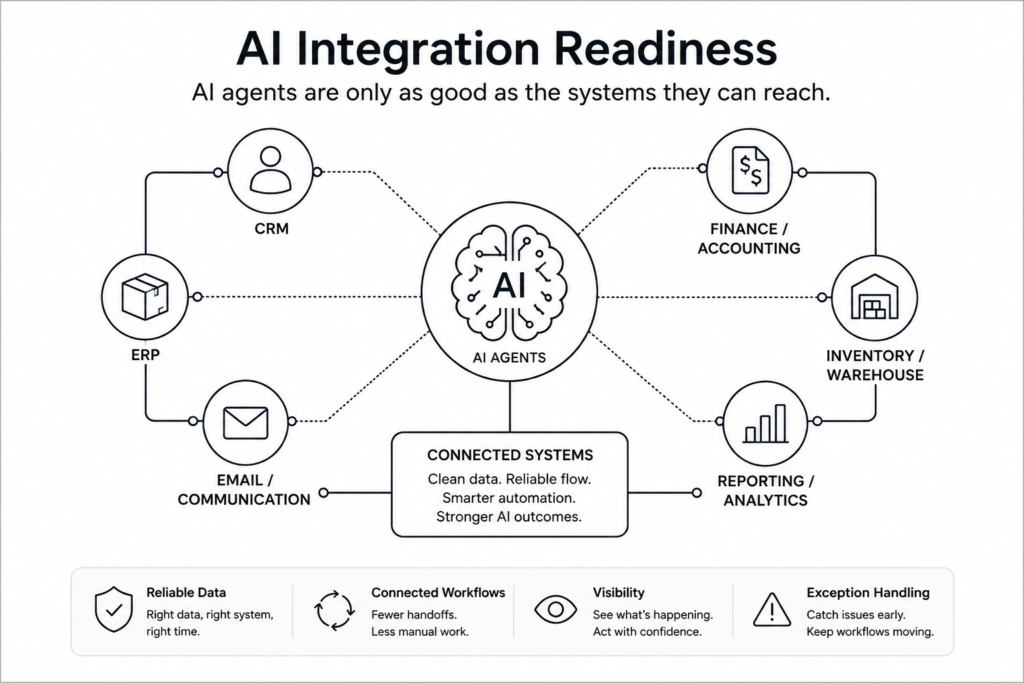
AI agents have become one of the biggest technology conversations for business leaders, but AI integration readiness will determine whether those tools create real business value. Before a company gives AI more responsibility across workflows, its systems need to share accurate, timely, and reliable information.
AI can support summaries, recommendations, task creation, customer follow-up, reporting, and workflow automation. It cannot magically fix disconnected systems. When your CRM, ERP, finance platform, email tools, spreadsheets, and reporting systems all hold different versions of the truth, AI may simply move bad data faster.
Business leaders should start with a practical question: are our systems ready to support AI?
Salesforce’s 2026 Connectivity Report reinforces that point. The report found that 96% of IT leaders say AI agent success depends on seamless data integration across systems.
What AI integration readiness really means
AI integration readiness means your business systems can support AI, automation, and reporting with reliable information.
That does not require a massive technology overhaul. Instead, the business needs to understand how data moves, where it slows down, and which systems need better connections.
A customer record may live in the CRM. Order status may come from an ERP. Payment details may sit in accounting software. Email may hold important customer communication. Reporting may depend on a spreadsheet that a team member updates manually.
Each system may serve a useful purpose. Problems start when those systems do not connect cleanly. Every handoff creates another opportunity for delay, duplicate work, or error.
AI does not remove that friction by default. In many cases, it exposes the weak points in the workflow.
Why AI agents need connected systems
An AI agent can only act on the information it can access. When the right systems do not communicate, the agent has limited context.
Consider a customer service workflow. An AI tool might draft a response, summarize an issue, or recommend a next step. But the tool may miss important context if order status sits in one system, payment details sit in another, and the CRM has outdated information.
The same problem shows up in sales, operations, finance, manufacturing, and reporting workflows.
Disconnected systems force teams to verify information manually. People still check records, move data, correct mistakes, and make sure the workflow reaches the finish line.
In that environment, AI becomes another layer on top of the problem instead of a practical solution.
Disconnected systems create weaken AI outcomes
Disconnected systems already create familiar business problems.
Teams copy data between platforms. Spreadsheets bridge departments. Reports take longer to prepare. Customer updates slow down. Duplicate records appear. Employees spend valuable time checking whether two systems agree.
AI can make those same issues more visible.
CIO Dive has reported on growing concern around AI agent sprawl, where too many disconnected agents and tools can add complexity instead of value when companies do not address integration and governance.
A disconnected workflow can lead to incomplete recommendations, duplicate actions, inaccurate summaries, or automation that still requires manual cleanup. The business may invest in a modern tool while still depending on old workarounds.
That is why AI integration readiness matters before a company scales AI across operations.
Stronger system connections create a stronger foundation for automation, reporting, and AI-supported workflows.
Start AI planning with the workflow, not the tool
Many companies begin AI conversations by comparing platforms. A more useful starting point is one workflow that already creates frustration.
Start with a sales handoff, customer intake process, order update, shipment notification, invoice step, reporting task, or CRM cleanup process. Then review how information moves from beginning to end.
Ask which system starts the workflow. Identify every platform involved. Look for the point where a person has to copy, export, import, review, or re-enter information. Confirm which system owns the source of truth. Review what happens when records do not match. Finally, look at how the team handles exceptions.
These questions reveal whether the business has a tool problem, a process problem, or an integration problem.
In many cases, the answer points to integration.
AI integration readiness does not require replacing everything
Preparing for AI does not always mean replacing existing systems.
Many businesses already use valuable software. The issue is that those tools may not communicate well. A company may need better APIs, cleaner data movement, stronger workflow automation, improved monitoring, or a more reliable connection between existing applications.
This matters even more for companies with legacy systems, custom databases, industry-specific platforms, or years of point-to-point integrations.
The goal is not to chase new technology for its own sake. The goal is to help the systems already running the business work together more effectively.
Practical integration work can create immediate value and prepare the business for better AI outcomes later.
What to review before adding AI to a workflow
Before adding AI to a business process, review the workflow underneath it.
Start by identifying the systems involved. Then look for manual steps the team has accepted as normal.
Common warning signs include data copied from one system to another, spreadsheets required to complete the workflow, reports built from manual exports, customer updates that require checking multiple platforms, conflicting records across systems, and automated workflows that still need a person to finish the last step.
Those signs do not mean the business has failed. They simply show where systems need better connections.
Improving those connections can reduce manual work now and prepare the business for more useful AI later.
The Work Horse perspective
AI can become a valuable part of business operations, but companies should not layer it on top of disconnected systems without a plan.
Start by mapping the workflow. Identify the system gaps. Connect the right platforms. Automate repeatable steps. Monitor exceptions. Then decide where AI can safely add value.
That is the foundation of AI integration readiness.
Before your business adds another AI tool, look at the systems underneath the workflow. If your team still copies data, checks multiple platforms, updates spreadsheets, or finishes automated processes by hand, an integration gap may need attention first.
Work Horse Integrations helps businesses connect the software they already use, reduce manual work, and create more reliable workflows.
 💡Tech Tip: Find the workflow your team still finishes by hand
If a process is “mostly automated” but still requires someone to copy data, update a spreadsheet, check another system, or send a follow-up manually, that step may be your biggest integration opportunity.
Look for one workflow where your team still moves data by hand.
That manual step may be creating delays, errors, duplicate work, or hidden costs.
Send Work Horse one workflow where your team still moves data by hand. We can help you find the disconnect and identify a practical path forward.