
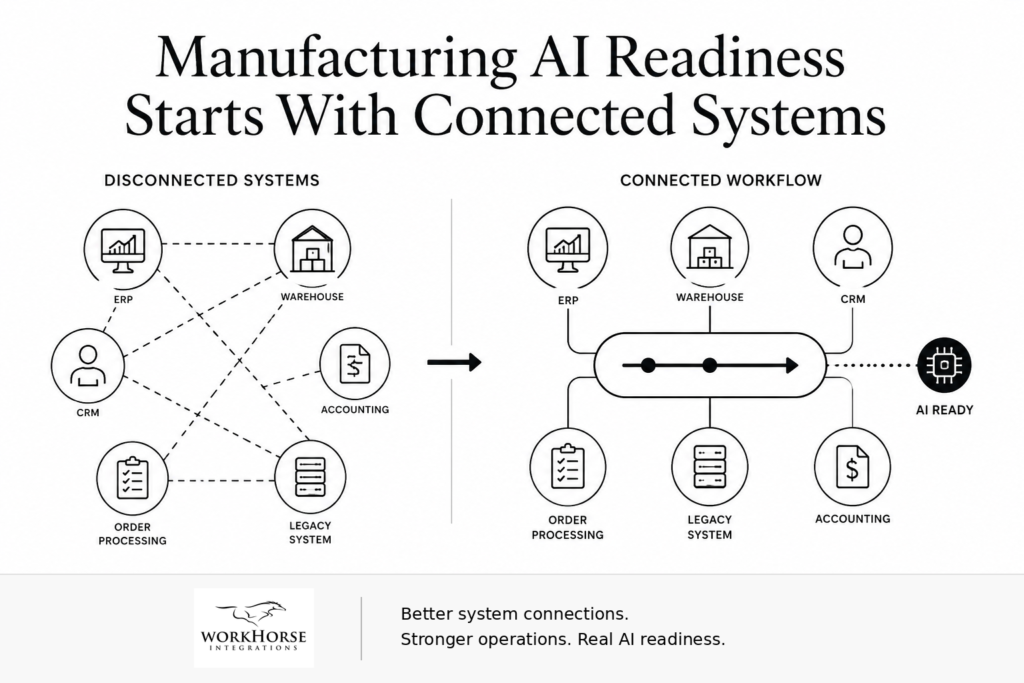
Manufacturing AI Readiness Starts With Connected Systems
Manufacturers are paying close attention to AI, but manufacturing AI readiness depends on more than new tools. Before AI can improve order processing, fulfillment, reporting, or customer response, the systems underneath those workflows need to share accurate and reliable information.
Many manufacturers already use the right software to run the business. ERP platforms, warehouse systems, accounting tools, CRM software, document management systems, customer portals, spreadsheets, and legacy applications all play a role. The challenge starts when those systems do not communicate cleanly.
AI cannot create better decisions from disconnected data. It needs strong system connections, clear data flow, and fewer manual handoffs.
Redwood Software’s Manufacturing AI and Automation Outlook 2026 found that 98% of manufacturers are exploring AI, but only 20% feel ready to use it at scale. Rockwell Automation’s 2026 State of Smart Manufacturing Report also highlights how manufacturers are moving from pilots toward execution, with AI playing a growing role in business outcomes.
Those findings point to a practical issue: manufacturers may want AI, but many still need stronger integration foundations first.
What manufacturing AI readiness really requires
Manufacturing AI readiness starts with visibility into how information moves through the business.
A manufacturer may store order data in an ERP, customer updates in a CRM, production details in a shop floor system, shipping information in another platform, and financial records in accounting software. Each system may work well on its own. Problems appear when teams need those systems to support one complete workflow.
A customer asks for an order update. Sales checks the CRM. Operations checks the ERP. Warehouse staff confirm fulfillment status. Accounting may need payment details. Someone may still use a spreadsheet to pull the full story together.
That process slows down the business. It also limits what AI can do.
AI tools need dependable access to the right information. When systems do not share data cleanly, teams still have to verify, reconcile, and correct information by hand.
Connected systems matter more than another AI tool
Manufacturers do not always need another platform. Many need better connections between the platforms they already use.
Disconnected systems create familiar problems across manufacturing operations. Order updates take longer than they should. Inventory details do not always match what customer service sees. Reporting depends on manual exports. Production and fulfillment teams work from different information. Legacy systems hold important data but do not easily connect to newer tools.
These issues may feel normal because teams have worked around them for years. But every workaround adds cost.
When a person has to export a file, rekey information, check two systems, or email another department for a status update, that person becomes the connector between systems. That creates delay, risk, and frustration.
Better integration gives data a cleaner path through the business. It also gives AI and automation tools a stronger foundation.
Legacy manufacturing systems can still support modern workflows
Manufacturing modernization does not always require replacing every older system.
Many manufacturers still rely on legacy platforms because those systems support critical operations. They may hold years of business logic, customer history, order information, production data, or financial records. Replacing them can create cost, risk, and disruption.
A better first step may involve connecting those systems more effectively.
Work Horse Integrations has helped manufacturing clients connect older systems with modern applications through APIs, MuleSoft, and supporting integration architecture. In one manufacturing example, Work Horse supported data sharing across platforms such as warehousing, accounting, human resources, CRM, document management, and legacy AS/400 systems.
In another manufacturing project, Work Horse helped modernize a MuleSoft environment by moving from one large Mule application to six smaller, focused applications. That change improved manageability and helped position the client for future technology needs.
The lesson is simple: manufacturers do not always need to remove trusted systems. Often, they need to give those systems better ways to communicate.
Start manufacturing AI readiness with one workflow
The best place to begin manufacturing AI readiness is usually one workflow that already causes friction.
Choose a process that affects customers, revenue, fulfillment, reporting, or team productivity. Good starting points often include order processing, shipment updates, inventory checks, production reporting, customer status requests, invoice handoffs, or CRM updates.
Then follow the information from beginning to end.
Identify the system that starts the workflow. List every platform involved. Look for the point where a person has to copy, export, import, email, verify, or re-enter information. Confirm which system owns the source of truth. Review how the team handles exceptions when records do not match.
That review usually reveals the real blocker. The company may not have an AI problem. It may have an integration problem.
What to review before adding AI to manufacturing operations
Before adding AI to a manufacturing workflow, review the process underneath it.
Look for places where people have accepted manual work as part of the job. A spreadsheet may bridge two systems. A customer update may require checking three platforms. A report may depend on a manual export. A shipment confirmation may require someone to match details across multiple sources.
Those steps show where the workflow needs stronger system connections.
A practical review should answer a few key questions:
✅ Which systems hold the data?
✅ Where does the workflow slow down?
✅ Who moves information by hand?
✅ Which records create the most rework?
✅ Where do errors appear?
✅ How does the team monitor exceptions?
✅ Which manual step could integration remove first?
Clear answers help the business prioritize the right improvement. Sometimes the fix may involve a lightweight automation. Other times, the workflow may need a custom API, a MuleSoft integration, better monitoring, or a broader architecture review.
The goal is not to automate everything at once. The goal is to remove the system gap that causes the most daily friction.
The Work Horse perspective
AI has real potential in manufacturing, but companies should not layer it on top of disconnected workflows without a plan.
Start with the systems that already run the business. Map one workflow. Find the manual handoff. Identify the source of truth. Connect the right platforms. Automate the repeatable steps. Monitor the exceptions. Then decide where AI can safely add value.
That is the foundation of manufacturing AI readiness.
Work Horse Integrations helps businesses connect legacy and modern systems, reduce manual work, and create more reliable workflows. Our team focuses on practical integration, API strategy, workflow automation, and business process improvement for companies that need their software to work together more effectively.
 💡Tech Tip: Find the manufacturing handoff your team still finishes by hand
If a process is “mostly automated” but still requires someone to copy data, update a spreadsheet, check another system, or send a follow-up manually, that step may be your biggest integration opportunity.
Look for one workflow where your team still moves data by hand.
That manual step may be creating delays, errors, duplicate work, or hidden costs.
Send Work Horse one workflow where your team still moves data by hand. We can help you find the disconnect and identify a practical path forward.